
Build an AI Home Lab That Works for You
Many people use AI, but do not yet have an AI work system that is private, repeatable, and easy to control. We help clients build an AI home lab with Hermes Agent + 9router, then organize two clear workspaces: office and personal.
This is more than installing an application. We design a foundation for coding, documentation, research, internal support, and automation—with clearer control over access, providers, costs, and data.
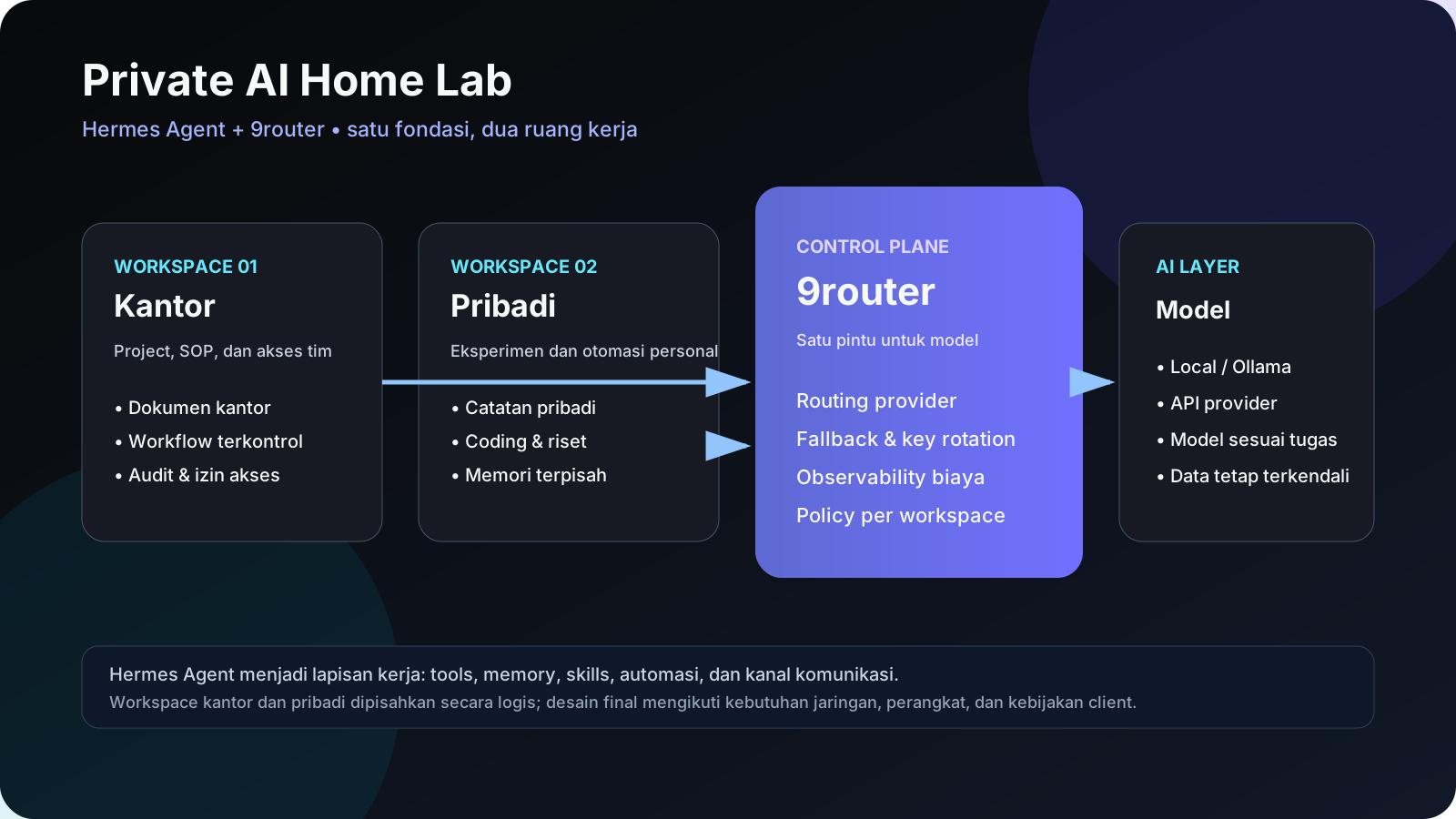
Why this combination?
- Hermes Agent is the work layer for tools, memory, skills, scheduled routines, and messaging channels.
- 9router is the model-routing layer, helping direct requests to the right provider or model with centralized key and fallback management.
- A home lab gives you more control over hardware, networking, data, and operating costs.
- Two workspaces keep office context separate from personal experiments.
Our principle: AI should accelerate work without making data, access, and cost impossible to control.
Two projects on one foundation
1. Office workspace
The office workspace is designed for structured, repeatable work:
- internal SOP and knowledge-base documentation;
- coding, review, and deployment assistance;
- meeting summaries and operational reports;
- repetitive task automation;
- workflows requiring permissions and traceability.
Office context, skills, memory, and integrations are separated from the personal workspace. You decide which data the office agent can use and who can access it.
2. Personal workspace
The personal workspace is suited to flexible experimentation:
- learning and technology research;
- personal projects;
- home-server automation;
- testing models and prompts;
- personal preferences and memory.
This separation keeps personal experiments productive without disturbing office workflows—and vice versa.
What we deliver
Discovery and architecture
We start with reality: available hardware, operating system, RAM/GPU, internet connection, remote-access needs, data types, target models, and the two projects you want to run. The design is based on actual constraints, not unrealistic hardware promises.
Home lab setup
Depending on scope, this may include Linux/Ubuntu baseline, Docker, storage, private networking, domain or tunnel, backups, monitoring, and basic hardening. If you already have a server or PC, we adapt the setup to it.
Hermes Agent configuration
We help configure Hermes Agent as the workflow center: profiles, memory, skills, tools, channels, and relevant automations. Office and personal configuration are kept separate so context does not mix.
9router integration
9router sits between workflows and AI providers as the model-routing layer. This makes model selection, provider fallback, key usage, and cost/performance evaluation easier to manage.
Two real project validations
Each workspace is tested with your actual projects—not an empty demo. We help define permissions, initial prompts, knowledge sources, allowed tools, and action boundaries.
Documentation and handover
You receive architecture documentation, secret-safe configuration notes, start/stop procedures, backup/restore guidance, and a basic troubleshooting checklist.
Our service flow
- Consultation — understand hardware, data, and both projects.
- Blueprint — define architecture, security boundaries, and model choices.
- Build — install the home lab, Hermes Agent, 9router, workspaces, and integrations.
- Validate — test office and personal workflows with real scenarios.
- Handover — documentation, short training, and next-step recommendations.
Security and limitations, explained upfront
A good AI home lab does not mean every piece of data is automatically safe or every model can run locally. We clearly separate:
- data that stays local from data sent to a provider;
- read-only access from system-changing access;
- secrets stored in environment or secret stores;
- private-network services from publicly exposed services;
- current hardware capability from potential upgrades.
For sensitive data, we can design local-model options, private networking, tool restrictions, logging, backups, and approval gates before risky actions. The final implementation follows your requirements and policies.
Who is this for?
This service is a good fit for:
- business owners who want AI assistance without losing control;
- developers and IT teams wanting an agent in their own environment;
- professionals who need separate work and personal AI;
- clients with an existing PC/server who want an AI lab;
- teams that want to start small with a clear upgrade path.
Start with your situation
You do not need perfect hardware to begin. Share your current device, internet connection, office needs, personal needs, and the two projects you want to run. We will help determine whether local, hybrid, or local + hosted is the most practical approach.