
From a Home Server to a Multi-Application Platform: Ubuntu, Docker, and CI/CD
By Khairul Abdi - Implementation notes from August to September 2026
A website that can be opened is only the first milestone. The next challenge is making sure updates can be shipped consistently, the database can be restored, uploaded files do not disappear when containers are replaced, and incidents can be noticed before users have to report them.
In this project, I built an Ubuntu Server environment for running multiple applications with different requirements. The stack includes Next.js frontends, a Laravel backend with a Filament dashboard, PostgreSQL, reverse proxy routing, and monitoring. Everything runs on a single machine with limited resources and a home internet connection behind CGNAT.
The result is not only a set of applications reachable from outside the local network. I also prepared CI/CD, manual production deployment from GitHub, image version tracking, scheduled database backups to an HDD, isolated restore testing, Docker image cleanup, and Telegram monitoring notifications.
This article explains what was built, which real problems appeared, how they were traced, and which lessons can be reused for other home server or small production setups.
This is a personal implementation case study, not a high availability claim, full security audit, or uptime guarantee. The status described here comes from recorded configuration and testing, not a live inspection at the time you read this article. Private access details and credentials are intentionally omitted.
Need help building your own home server?
If you want to run websites, dashboards, databases, automatic backups, monitoring, and cleaner deployment on your own home server, I can help prepare Ubuntu Server, Docker, HTTPS domain routing, CI/CD, private access, scheduled database backups, scheduled Docker cleanup, and a security baseline according to your application needs.
Direct WhatsApp consultation: Contact 085358316708
The initial message is prefilled so the discussion can go directly into server requirements, applications, backup, monitoring, and security.


Technology stack
The stack was selected for a home server that still needs real operational discipline: applications run in containers, releases are controlled through a pipeline, the database has scheduled backups, storage is maintained with cleanup jobs, and administrative access is separated from public access.
Result summary
| Area | Recorded result | Practical benefit |
|---|---|---|
| Public application access | Websites are reachable through HTTPS domains and were tested from a mobile network | Visitors do not need to be inside the home network |
| Multiple applications | GreetingCard, Masjid frontend, and Masjid backend run in separate containers | Runtime and configuration are easier to manage |
| Administrative access | SSH and database access use Tailscale | Admin ports do not need to be exposed directly to the internet |
| CI/CD | CI checks and manual GitHub deployment work across three repositories | Updates follow a repeatable process |
| Version tracking | Deployment records commit, image, deployment time, and public checks | The running version is easier to trace |
| Database backup | Scheduled backups to HDD and checksum files are available | Data has a defined backup and retention flow |
| Restore testing | Masjid backups were restored to a separate PostgreSQL test container | Backups were not only created, but also proven readable |
| Monitoring | Uptime Kuma, health checks, and Telegram notifications are configured | Application and infrastructure status can be observed |
| Storage maintenance | Docker log rotation and scheduled image/build cache cleanup are prepared | Disk growth is easier to control |
Table of contents
- Initial context and constraints
- Architecture
- Setup stages
- Troubleshooting from evidence
- CI/CD and database migration flow
- Storage, backup, and restore testing
- Monitoring and maintenance
- Security boundaries
- Local AI experiment
- Evidence and limitations
- Next improvements
- Services I can help with
- Project discussion
Initial context and constraints
The machine used an Intel Core i3-5005U processor, 8 GB RAM, a 500 GB SSD, and a 1 TB HDD. The operating system was Ubuntu Server 24.04 LTS.
The needs were clear:
- Run several websites and applications on one server.
- Publish websites without relying on router port forwarding.
- Access the server remotely for administration.
- Separate application code, secret configuration, database data, and uploaded files.
- Build a more orderly deployment process than running different manual commands every time.
- Keep storage usage under control so images and logs do not pile up forever.
Because the home connection used CGNAT, direct inbound access was not a practical option. I separated the visitor path from the administrator path: Cloudflare Tunnel for public web access, and Tailscale for private administration.
Docker Compose was chosen because the initial needs were still manageable on a single host. At this stage, adding a cluster or Kubernetes was not a proven requirement.
The success measure was not how many tools were installed, but whether the applications could be run, updated, checked, and restored through a process that could be understood.
Architecture
Visitor path and application communication
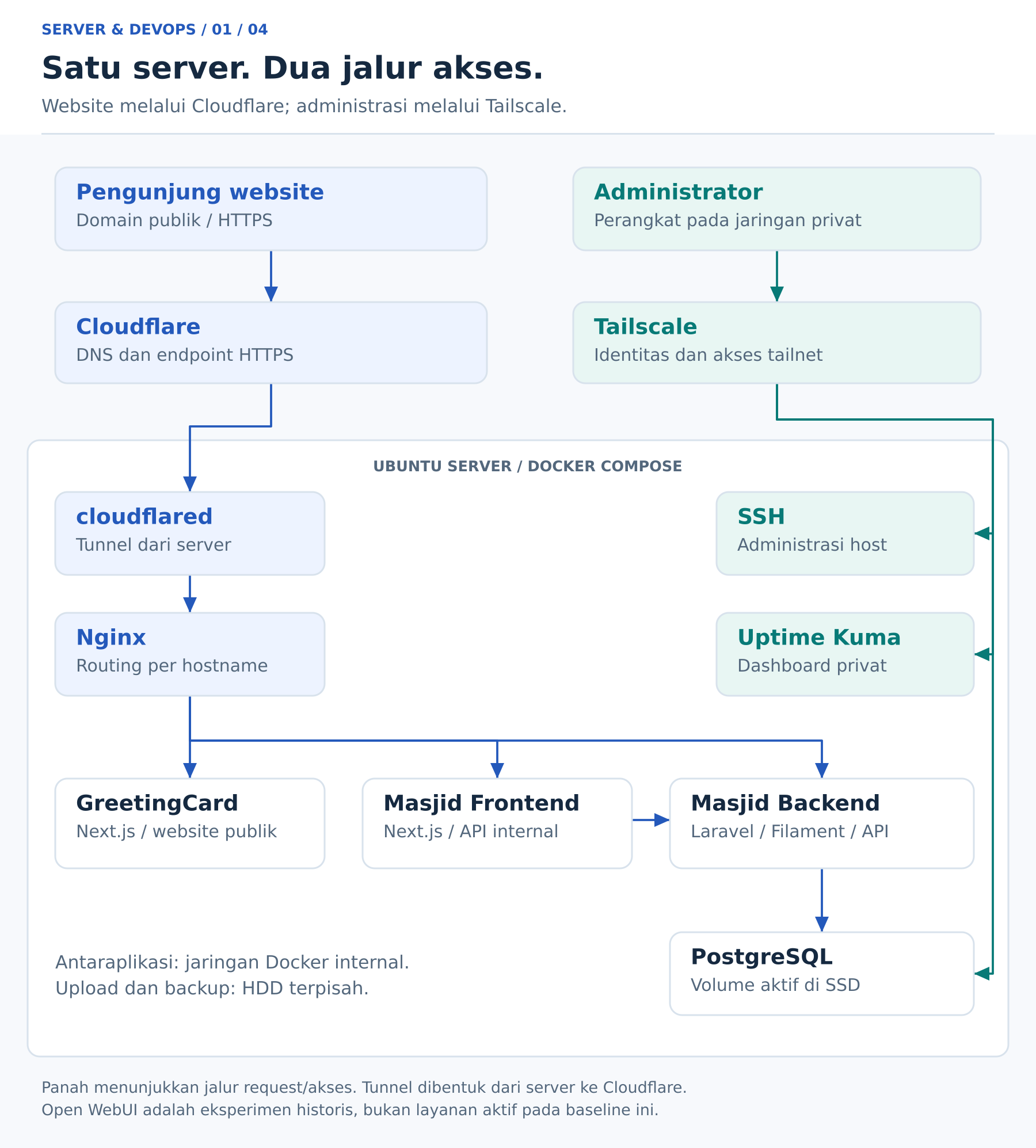
Figure 1. Public and administrative paths are separated. The arrows describe request and access paths, not the direction in which tunnels are established. Open SVG diagram.
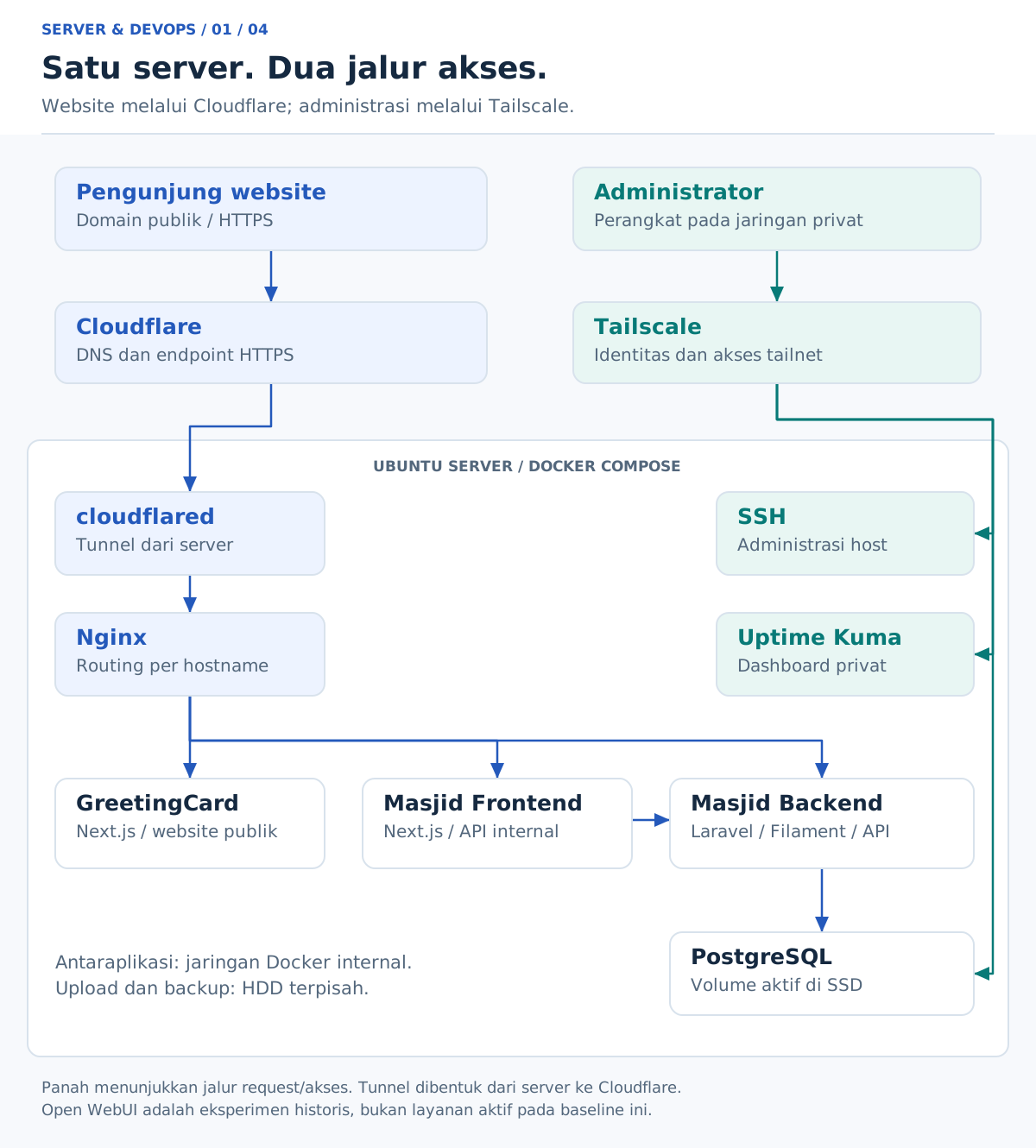
Cloudflared creates an outbound tunnel connection from the server to Cloudflare. Nginx receives traffic from the tunnel and routes each hostname to the correct application. Backend and frontend services communicate through an internal Docker network, so server-to-server calls do not have to go through public domains.
Docker networking helps service communication, but it does not replace API authentication. Access control still has to be enforced by the application.
Domain split
| Address | Purpose |
|---|---|
greetingcard.id and www.greetingcard.id | GreetingCard website |
masdjidalfurqon.com | Masjid Al Furqon landing page |
www.masdjidalfurqon.com | Redirect to the main Masjid domain |
dashboard.masdjidalfurqon.com/admin | Filament administration dashboard |
dashboard.masdjidalfurqon.com/api | Laravel API endpoint prefix |
dashboard.masdjidalfurqon.com/up | Laravel application health endpoint |
Administrative path
The administrator laptop connects through Tailscale for SSH, PostgreSQL access, and Uptime Kuma. Private services are not published as open public websites.
Nginx and PostgreSQL are bound carefully for this setup. Remote database access uses the configured Tailscale path, not a public database port.
Setup stages
1. Preparing system and storage
The setup started with Ubuntu updates, service checks, HDD mounting, and mount validation. The SSD is used for the system, applications, Docker images, and active database data. The HDD mounted at /data is used for larger application files and backups.
Checks such as findmnt, df, and free helped separate disk capacity, RAM usage, and filesystem cache. A directory named /data is not proof that writes are going to the HDD; the mount must be verified.
2. Preparing private access
Tailscale was installed on Ubuntu and the administrator devices. Testing was done gradually: device connectivity, SSH port reachability, then authentication.
One early lesson was separating an unreachable SSH service from Tailscale SSH asking for additional identity verification. Both feel like "I cannot log in", but the fix is different.
Host firewall rules were also configured. Because Docker manages its own networking rules, security checks cannot stop at UFW status; exposed bindings and forwarding behavior must also be reviewed.
3. Running applications with Docker
The Masjid backend uses Laravel 11, Filament 3, Apache, PHP 8.4, and PostgreSQL. The Masjid frontend and GreetingCard are built with Next.js.
Container work included:
- Dockerfiles and
.dockerignorefiles aligned with each build flow. - PHP dependencies and extensions required by the backend.
- Apache configuration for Laravel's
publicdirectory. - Multi-stage builds for frontend applications.
- Non-root users in frontend runtime images.
- Persistent storage so uploads do not only live inside a container writable layer.
The goal was to reduce manual host configuration while still making image updates and testing repeatable.
4. Separating environment and secrets
Backend and frontend configuration were kept outside the source repositories. Secret file permissions were restricted, and credentials were not committed to Git.
Important runtime differences:
- In Next.js,
NEXT_PUBLIC_*variables referenced by browser code can be embedded at build time. - Server-side variables may be read at runtime if the implementation supports it.
- Static rendering can make some output fixed during the build.
- Laravel configuration cache must be refreshed after environment changes.
BuildKit secrets were used for frontend builds. Secret mounts do not automatically become image layers, but build code can still copy or embed values into output. BuildKit secrets do not make public client-side secrets safe.
5. Connecting domains and reverse proxy
The domain registration did not need to be moved. DNS management was connected to Cloudflare by setting the assigned nameservers.
Email records such as MX, SPF, and DKIM were kept in mind so publishing websites would not break other services. After DNS, tunnel hostnames and Nginx routing were aligned.
Testing covered root domains, www, dashboard access, redirects, and health endpoints, including checks from outside the home network.
Troubleshooting from evidence
Several problems were handled by reading concrete symptoms instead of guessing:
- The host could reach the internet while containers timed out, which pointed to container networking and DNS behavior.
- PHP dependencies did not match the runtime image, so the image had to include the required extensions.
- A Laravel route existed but
/upreturned 404 because application routing and deployment state did not match expectations. - HTTPS became HTTP during login redirects, which required reviewing proxy headers and application URL configuration.
- API calls worked with
curl, but the frontend did not show data because browser-facing configuration had been baked into the build. - CI failed even though a local build had worked, proving that the pipeline environment must be treated as its own runtime.
CI/CD and database migration flow
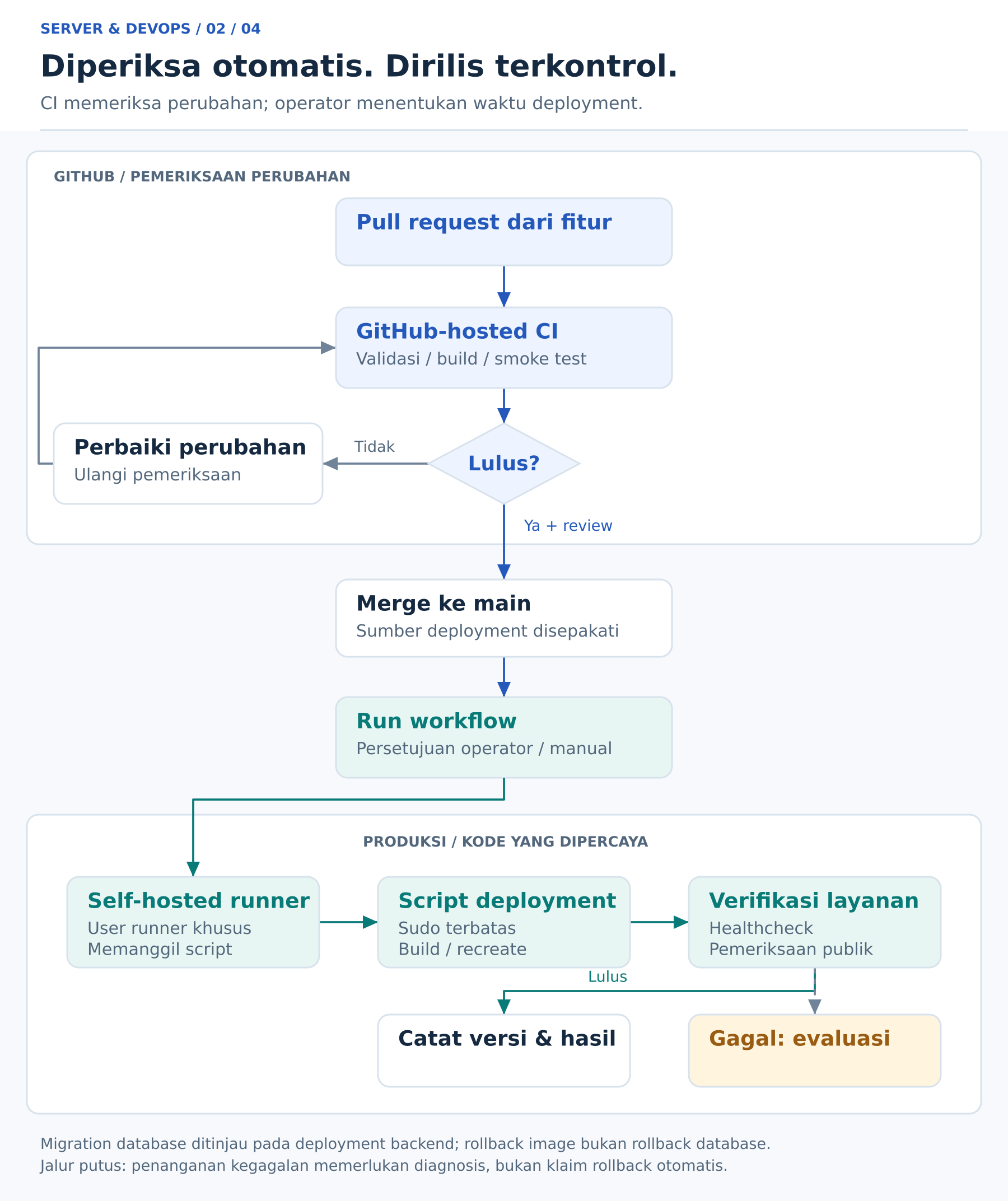
Figure 2. Change verification is separated from privileged production execution. Deployment failure requires evaluation; the diagram does not claim automatic rollback. Open SVG diagram.
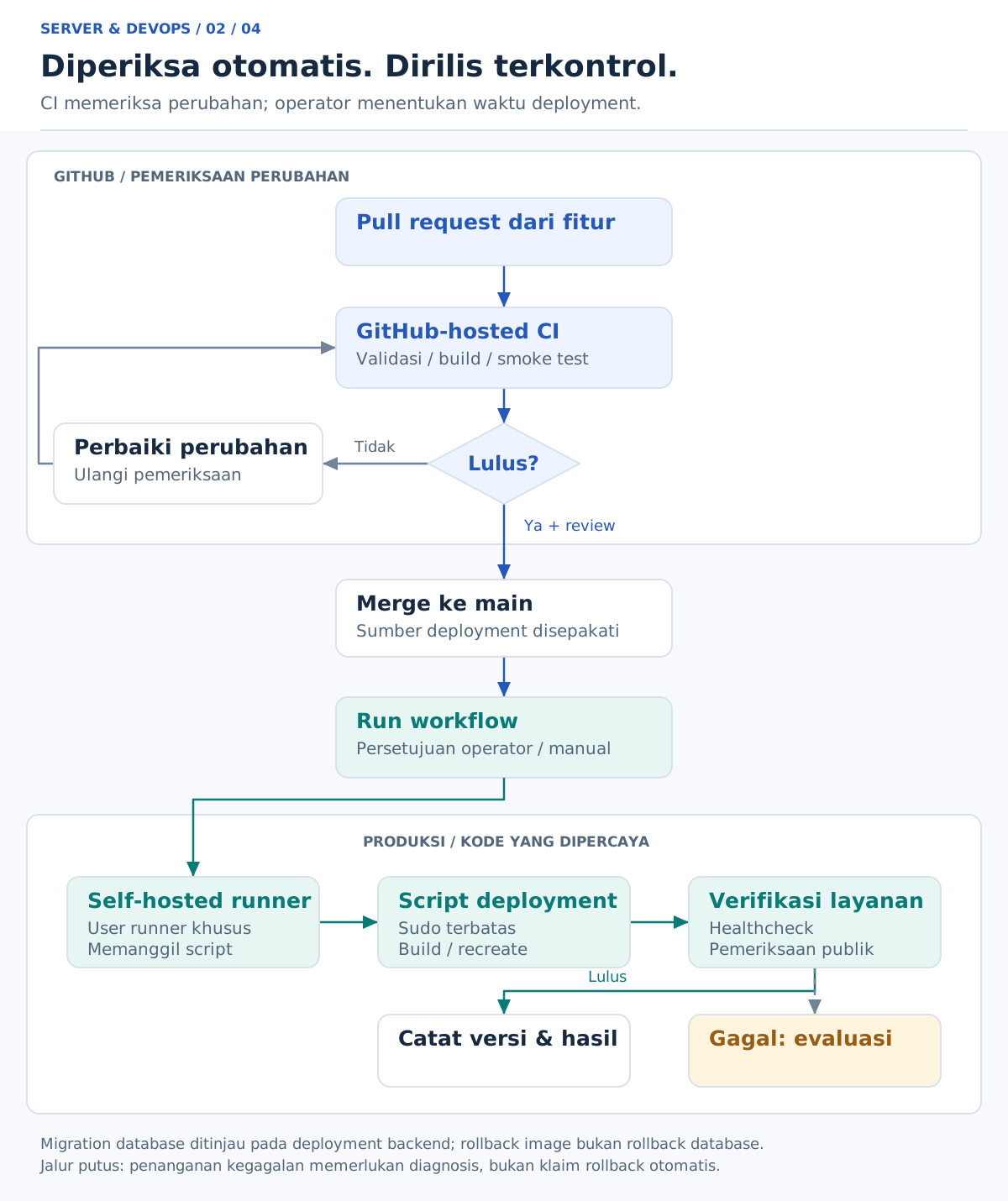
CI checks whether code can be built and validated. CD applies approved changes to the production server. Keeping these responsibilities separate makes failures easier to understand.
Deployment records the commit, image, deployment time, and public health checks. This makes it easier to answer what version is currently running and what changed during a release.
Database migrations are treated as production changes. They need backups, ordering, and rollback thinking. A successful application build does not automatically mean a migration is safe for existing data.
Storage, backup, and restore testing
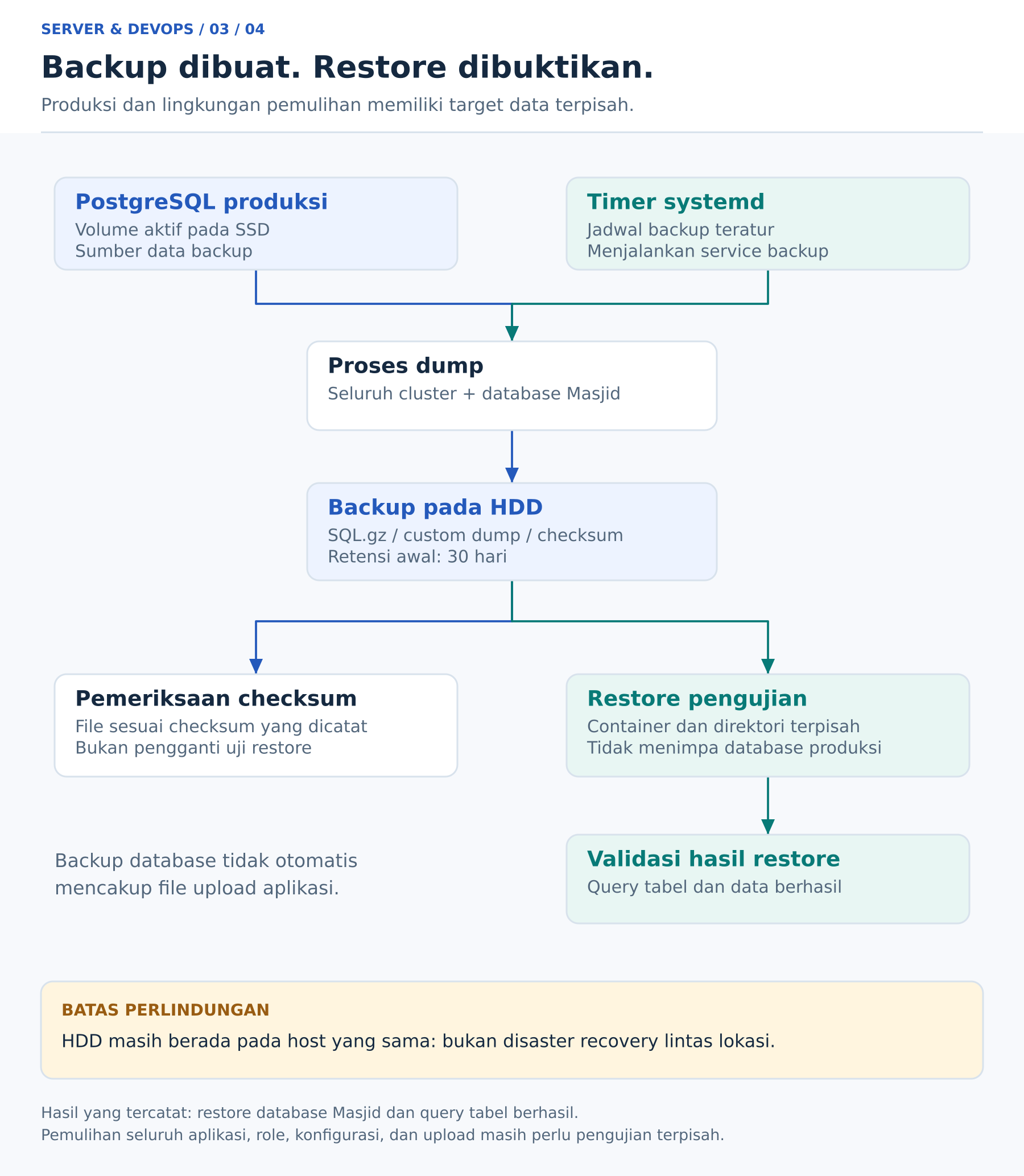
Figure 3. Integrity checks and restore tests provide different evidence. Database backups do not automatically include uploaded application files. Open SVG diagram.
Data that can be rebuilt is separated from data that must be preserved. Images and build cache can be recreated; database records and uploaded files need planned storage and backup.
Scheduled PostgreSQL backups are written to the HDD with retention rules and checksums. Restore testing is done against a separate PostgreSQL container so production data is not overwritten.
This distinction matters: a backup file existing on disk is not the same as a backup that has been proven restorable.
Monitoring and maintenance
Monitoring covers several layers:
- Public endpoint availability.
- Application health routes.
- Container state.
- Disk usage.
- Backup and maintenance job results.
Uptime Kuma and Telegram notifications provide early signals. Docker log rotation and scheduled image/build cache cleanup keep storage growth more predictable.
Health checks are useful, but they should represent real application readiness. A container that is running is not always an application that can serve users correctly.
Security boundaries
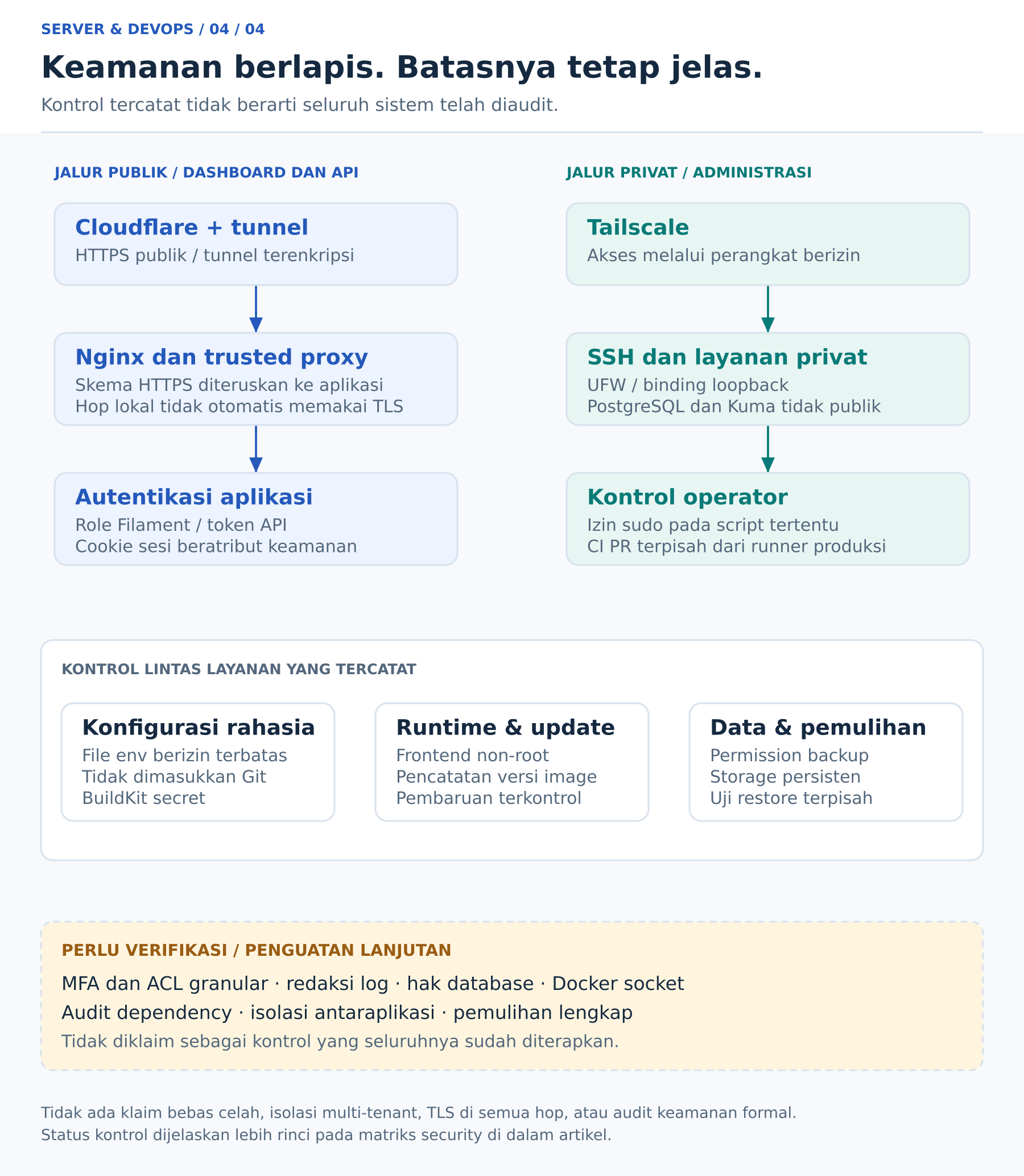
Figure 4. The diagram summarizes control layers, not every packet path. Recorded controls are separated from hardening that still needs further verification. Open SVG diagram.
Security work focused on boundaries:
- Public users reach only the public web path.
- Administrators use private Tailscale access.
- Database access is not exposed as a public internet service.
- Secrets are kept outside repositories.
- Uploads, backups, and runtime data are treated differently from rebuildable artifacts.
Authentication proves who a user is. Authorization controls what the user can do. Both are still required even when services are on an internal Docker network.
Local AI experiment
Open WebUI and local AI tools were explored as a possible private AI interface. On limited hardware, the main point is to set expectations correctly: local AI can be useful for private experiments and lightweight workflows, but heavier models need stronger compute.
For client projects, the practical setup depends on goals: local model, hosted model, private knowledge base, chatbot integration, or automation workflow.
Evidence and limitations
The implementation was validated through recorded configuration, build results, deployment checks, public access tests, backup files, checksums, and restore testing.
The system is still a single-host setup. It should not be presented as high availability. Hardware failure, power loss, ISP disruption, and misconfiguration remain realistic risks.
The project is best understood as a practical, controlled home server platform for websites and small applications, not a replacement for a full cloud architecture when higher availability is required.
Next improvements
Possible next improvements include:
- More detailed backup reporting.
- Offsite backup copies.
- More complete alert routing.
- Dependency and image update scheduling.
- Better dashboarding for resource usage.
- Additional restore drills.
Services I can help with
Ubuntu Server setup and administrative access
Installing Ubuntu Server, storage mounting, SSH, firewall basics, Tailscale access, users, permissions, and operational documentation.
Dockerization and application publishing
Preparing Dockerfiles, Docker Compose, Nginx reverse proxy, domain routing, HTTPS, Cloudflare Tunnel, and persistent storage.
CI/CD and release process
Setting up GitHub Actions checks, manual deployment flow, version tracking, and post-deployment verification.
PostgreSQL, backup, and restore testing
Preparing database containers, scheduled backups, retention, checksum files, and isolated restore testing.
Monitoring, maintenance, and troubleshooting
Setting up Uptime Kuma, health checks, Telegram notifications, Docker log rotation, scheduled cleanup, and incident investigation.
AI setup
Setting up private or local AI tools, chatbot workflows, knowledge bases, and integration with existing applications.
Project discussion
If you want to build a home server from an unused laptop or PC, migrate a small application to Docker, or set up private AI tooling, start with a short consultation. The discussion can cover hardware, internet connection, domain, applications, backup requirements, security expectations, and budget.